In our application we read the windows register key `HARDWARE\\DEVICEMAP\\SERIALCOMM` through windows API and list all the sub key and value.
2018年5月6日 星期日
GO : List all the serial port in windows use golang-sys package
We can easily get all the serial port in windows using regedit.exe
In our application we read the windows register key `HARDWARE\\DEVICEMAP\\SERIALCOMM` through windows API and list all the sub key and value.
2018年4月2日 星期一
CC2640:Change RF front end mode and bias
1. In ../main.c define your own BLE configuration template.
2.The option and default configuration is define in ../ble_user_config.h
The internal bias and external bias is determine by the RX_TX pin, which didn't implement in 7x7 package.In our application we use the CC2592 as PA and use 5x5 package for smaller footprint, and the configuration is differential mode internal bias.
Ref:
1.CC26xx HW Training : RF Front End options and Antennas
2.CC2640 在 Beacon 应用中的实现方法
3.CC26x0 SimpleLink™Bluetooth®low energy Software Stack 2.2.xDeveloper's Guide
2.The option and default configuration is define in ../ble_user_config.h
The internal bias and external bias is determine by the RX_TX pin, which didn't implement in 7x7 package.In our application we use the CC2592 as PA and use 5x5 package for smaller footprint, and the configuration is differential mode internal bias.
Ref:
1.CC26xx HW Training : RF Front End options and Antennas
2.CC2640 在 Beacon 应用中的实现方法
3.CC26x0 SimpleLink™Bluetooth®low energy Software Stack 2.2.xDeveloper's Guide
2018年1月17日 星期三
CC2640:Use System_printf in project.
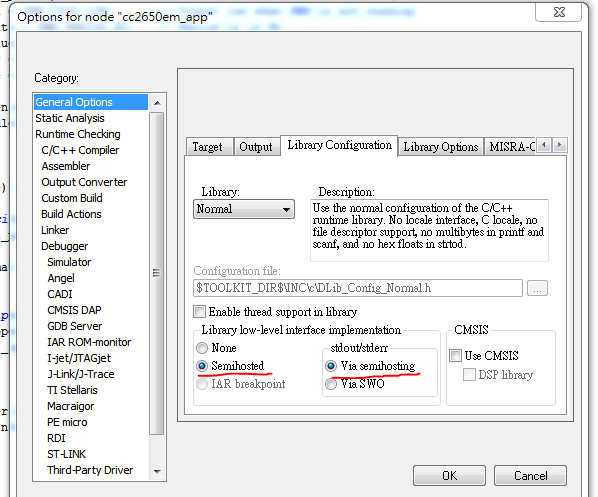
1.I use IAR as IDE to develop CC2640 BLE project and XDS100V3 as debugger.First make sure enable the Semihosted and Via semihosting in General Options.
2.Add below code in app_ble.cfg file.
3.Add include header file and test.
4.In debug mode enable View->Terminal I/O and we can see the Hello World! in terminal.

Ref:
1.System_printf and printf() on CC2650 sensorTag
2.System_printf supported format specifications
2.Add below code in app_ble.cfg file.
3.Add include header file and test.
4.In debug mode enable View->Terminal I/O and we can see the Hello World! in terminal.

Ref:
1.System_printf and printf() on CC2650 sensorTag
2.System_printf supported format specifications
2017年12月24日 星期日
CC2640: Add Watchdog driver to project.
1.Add ble_sdk_2_02_01_18\src\components\services\src\watchdog
Watchdog.h, WatchdogCC26XX.c, WatchdogCC26XX.h to your project, and add
$SRC_COMMON$/services/src/watchdog to your project include path.
2.In CC2650DK_5XD.h(Select what platform you use) add below code.
3.In CC2650DK_5XD.c(Select what platform you use) add below code.
4.Add below code to your application.
Ref:
1.RTOS/CC2640: How to set CC2640 watchdog with TIRTOS 2.13
2.WatchdogCC26XX.h File Reference
3.CC2640 看门狗
4.http://blog.csdn.net/zzfenglin/article/details/52253536
Watchdog.h, WatchdogCC26XX.c, WatchdogCC26XX.h to your project, and add
$SRC_COMMON$/services/src/watchdog to your project include path.
2.In CC2650DK_5XD.h(Select what platform you use) add below code.
3.In CC2650DK_5XD.c(Select what platform you use) add below code.
4.Add below code to your application.
Ref:
1.RTOS/CC2640: How to set CC2640 watchdog with TIRTOS 2.13
2.WatchdogCC26XX.h File Reference
3.CC2640 看门狗
4.http://blog.csdn.net/zzfenglin/article/details/52253536
2017年11月9日 星期四
BLE Mesh Overview(2)
BLE Mesh Overview (2)
Flooding:
Each packet will broadcast to every node in the network until it reaches the target node(s).
Complemented by three types of addressing. “Unicast” (used during initial node set-up), “group”, and
“virtual” (primarily used by device manufacturers to ‘label’their products).
Of these, group addressing is the most applicableto everyday operation. A groupaddress is a multicast address which represents one or more elements in the network. The SIG has defined four “Fixed Group Addresses” named “All-proxies”, “All-friends”, “All-relays”, and “All-nodes”
to specifically address the types of nodes defined above.
In addition to these group addresses, the installer will likely allocate dynamic group addresses
during configuration to reflect the physical mesh layout. For example, dynamic group addresses could be allocated to the lights in each room of a building.
The specification includes several mechanisms to mitigate advertising and scanning channel congestion. The first is a “Time-To- Live” (TTL) counter that defines how many times a specific packet can be relayed – after a defined number of steps, the packet will not be relayed further.
The second congestion prevention mechanism is a message cache of transmitted packets. A packet can only arrive in the cache once it has circulated completely around the mesh – at which point it can safely be assumed that further transmission is unnecessary. An “optional relaying” feature also limits mesh congestion. By switching off relaying, nodes can receive packets but not
pass them on. Optional relaying adds complexity—because the designer must trade-off mesh flexibility against bandwidth consumption—but in doing so improves overall mesh performance.
Security :
Provisioning is the process by which otherwise isolated devices become nodes on the mesh network and can be implemented via an app supported on a smartphone or tablet. The process follows five steps: Beaconing (indicating availability to join the mesh); Invitation (from the provisioning device); Public Key Exchange;Authentication; and Session Key Exchange (securing the
subsequent distribution of data to complete provisioning). The provisioning process implements a high degree of security. Thereafter, packets are end-to-end encrypted with AES-128, with privacy enhanced by additional AES-128 encryption between each relay (in part to hide the node addresses). In addition, procedures are included to periodically refresh the encryption keys, and to detect and repel “replay attacks”.
Ref:
1. ULP Wireless Quarter 10-11
2. nRF5 SDK for Mesh
3. Introducing Bluetooth Mesh Networking
4.How to build a wireless sensor-driven lighting control system based on Bluetooth mesh
networking - Silvair
5.2017 Introducing Bluetooth Mesh
6.Le IoT 想想物聯網 - mesh network topology of BLE 介紹 (1) - Star & Mesh Topology 簡介
Flooding:
Each packet will broadcast to every node in the network until it reaches the target node(s).
Complemented by three types of addressing. “Unicast” (used during initial node set-up), “group”, and
“virtual” (primarily used by device manufacturers to ‘label’their products).
Of these, group addressing is the most applicableto everyday operation. A groupaddress is a multicast address which represents one or more elements in the network. The SIG has defined four “Fixed Group Addresses” named “All-proxies”, “All-friends”, “All-relays”, and “All-nodes”
to specifically address the types of nodes defined above.
In addition to these group addresses, the installer will likely allocate dynamic group addresses
during configuration to reflect the physical mesh layout. For example, dynamic group addresses could be allocated to the lights in each room of a building.
The specification includes several mechanisms to mitigate advertising and scanning channel congestion. The first is a “Time-To- Live” (TTL) counter that defines how many times a specific packet can be relayed – after a defined number of steps, the packet will not be relayed further.
The second congestion prevention mechanism is a message cache of transmitted packets. A packet can only arrive in the cache once it has circulated completely around the mesh – at which point it can safely be assumed that further transmission is unnecessary. An “optional relaying” feature also limits mesh congestion. By switching off relaying, nodes can receive packets but not
pass them on. Optional relaying adds complexity—because the designer must trade-off mesh flexibility against bandwidth consumption—but in doing so improves overall mesh performance.
Security :
Provisioning is the process by which otherwise isolated devices become nodes on the mesh network and can be implemented via an app supported on a smartphone or tablet. The process follows five steps: Beaconing (indicating availability to join the mesh); Invitation (from the provisioning device); Public Key Exchange;Authentication; and Session Key Exchange (securing the
subsequent distribution of data to complete provisioning). The provisioning process implements a high degree of security. Thereafter, packets are end-to-end encrypted with AES-128, with privacy enhanced by additional AES-128 encryption between each relay (in part to hide the node addresses). In addition, procedures are included to periodically refresh the encryption keys, and to detect and repel “replay attacks”.
Ref:
1. ULP Wireless Quarter 10-11
2. nRF5 SDK for Mesh
3. Introducing Bluetooth Mesh Networking
4.How to build a wireless sensor-driven lighting control system based on Bluetooth mesh
networking - Silvair
5.2017 Introducing Bluetooth Mesh
6.Le IoT 想想物聯網 - mesh network topology of BLE 介紹 (1) - Star & Mesh Topology 簡介
BLE 5 Overview
Bluetooth 5 it is highly likely they belong to one or more of these three major advancements:
Advertising extensions :
Allow add more payload on advertising data packet. by use the secondary
advertisement channel(previous data channel).enables chaining of advertising packets to create
greater advertising data payloads of up to 255 bytes.
Periodic advertisements comprises packets sent at a fixed interval to synchronized devices via
“connectionless” broadcasting.By using periodic advertisements,scanning devices can more
consistently “follow” the advertiser and monitor its updates more frequently.
Connectionless broadcasting is further boosted because Bluetooth 5 features an eight times
higher broadcast capacity compared to previous versions of the technology.
Ref:
1. ULP Wireless Quarter 20
2. Taking a deeper dive into Bluetooth 5
- 2Mbs for higher throughput and/or energy saving
- 500/125kbs modes for considerably increased range (x4)
- Advertising extensions for increased broadcast capacity (x8)
Advertising extensions :
Allow add more payload on advertising data packet. by use the secondary
advertisement channel(previous data channel).enables chaining of advertising packets to create
greater advertising data payloads of up to 255 bytes.
Periodic advertisements comprises packets sent at a fixed interval to synchronized devices via
“connectionless” broadcasting.By using periodic advertisements,scanning devices can more
consistently “follow” the advertiser and monitor its updates more frequently.
Connectionless broadcasting is further boosted because Bluetooth 5 features an eight times
higher broadcast capacity compared to previous versions of the technology.
Ref:
1. ULP Wireless Quarter 20
2. Taking a deeper dive into Bluetooth 5
BLE Mesh Overview(1)
SIG announce the BLE mesh at 2017 July. Not only for BLE 5 but also compatible with BLE4.0 (or later). BLE mesh is implement by add new layers on the BLE physical layer so it need to make appropriate modification on the old BLE 4.0 firmware to get the mesh work.
Bluetooth mesh follows Bluetooth technology’s architecture whereby GATT
“Profiles”.To avoid GATT Profiles being mistaken for the mesh equivalent, mesh profiles
are called “Models”
The Bluetooth mesh specification details four types
Relay Nodes :
Relay Nodes re-transmit received packets and are the mechanism by which packets rapidly propagate across the entire network.The downside of relaying is increased current consumption because it relies on the nodes being continuously ‘awake’.
Low Power Nodes & Friend Nodes:
Low Power Nodes work in tandem with “Friend Nodes”.Friend Nodes are typically
mains powered so can remain permanently awake; the devices cache any messages destined
for the LPN. The LPNs switch to receive’ mode according to a predetermined schedule, accept
cached messages, operate as instructed, and then rapidly return to a power-saving ‘sleep’ state.
Proxy Nodes:
Proxy Nodes allow devices that run the Bluetooth low energy stack but don’t support Bluetooth
mesh (for example, the current generation of smartphones) to connect to a Bluetooth mesh network. Interaction is achieved via both the node and device’s Generic Attribute Profile (GATT) interface.
Ref:
1. ULP Wireless Quarter 10-11
2. nRF5 SDK for Mesh
3. Bluetooth mesh networking SIG
Bluetooth mesh follows Bluetooth technology’s architecture whereby GATT
“Profiles”.To avoid GATT Profiles being mistaken for the mesh equivalent, mesh profiles
are called “Models”
The Bluetooth mesh specification details four types
Relay Nodes :
Relay Nodes re-transmit received packets and are the mechanism by which packets rapidly propagate across the entire network.The downside of relaying is increased current consumption because it relies on the nodes being continuously ‘awake’.
Low Power Nodes & Friend Nodes:
Low Power Nodes work in tandem with “Friend Nodes”.Friend Nodes are typically
mains powered so can remain permanently awake; the devices cache any messages destined
for the LPN. The LPNs switch to receive’ mode according to a predetermined schedule, accept
cached messages, operate as instructed, and then rapidly return to a power-saving ‘sleep’ state.
Proxy Nodes:
Proxy Nodes allow devices that run the Bluetooth low energy stack but don’t support Bluetooth
mesh (for example, the current generation of smartphones) to connect to a Bluetooth mesh network. Interaction is achieved via both the node and device’s Generic Attribute Profile (GATT) interface.
Ref:
1. ULP Wireless Quarter 10-11
2. nRF5 SDK for Mesh
3. Bluetooth mesh networking SIG
訂閱:
文章 (Atom)
Linux driver: How to enable dynamic debug at booting time for built-in driver.
Dynamic debug is useful for debug driver, and can be enable by: 1. Mount debug fs #>mount -t debugfs none /sys/kernel/debug 2. Enable dy...
-
The root cause is miss use a pointer to a static variable like: int x = 1; int y = (int) &x; Modify version int x = 1; int *y =...
-
1.Download Astyle http://astyle.sourceforge.net/ 2. Open Keil -> Tool -> Customize Tool Menu config as below My argument. Can ...
-
1.Create the project folder and win_gui_v1.go in your go work space > cd ..\src\ > mkdir win_gui_v1 2.Copy the .manifest file...
