顯示具有 CC2640 標籤的文章。 顯示所有文章

2018年8月1日 星期三

CC2640: Bus fault exception error on AuxAdiDdiSafeWrite function

Temporary solution : Disable the Power Saving feature on your project and rebuild both stack and app project.

My BLE stack version is 2_02_01_18, TI RTOS CC26xx version is 2_20_01_18,  XDC tool version is 3_32_00_06

I guess the reason of this error is cause by the power constrain setting and peripheral issue, because the power initial code in [9],  but I am not very sure since I didn't go deep in this problem now.


 Some related source:
    1.CC26XX Driver lib document:AuxAdiDdiSafeWrite 
    2.CC2640: Bus fault after random number of packets received to cc2640
    3.CC2650调试问题
    4.CC2640 - Sensor Controller power consumption
    5.hard fault in CC3200 I2C
    6.I2C Peripheral Setup Causes a processor Force Hardware Fault
    7.RTOS/CC2640: Hard Fault: FORCED: BUSFAULT: PRECISERR.Data Access Error.
    8.Hard Fault: FORCED: BUSFAULT: PRECISERR.Data Access Error
    9.CC2650 as I2C Slave

Reason?


  1. CC2640如何在打开PowerSaving模式下唤醒并操作uart?
  2. RTOS/CC2640: Unresponsive in power saving mode
  3. CC2640 UART With Power Saving
  4. Power Managementfor CC26xx SimpleLink Wireless MCUsUser’s Guide
  5. Where and why the SMPH0 reset error (keep 0) did not release


2018年5月28日 星期一

2018年4月2日 星期一

CC2640:Change RF front end mode and bias

1. In ../main.c define your own BLE configuration template.
2.The option and default configuration is define in ../ble_user_config.h
 

The internal bias and external bias is determine by the RX_TX pin, which didn't implement in 7x7 package.In our application we use the CC2592 as PA and use 5x5 package for smaller footprint, and the configuration is differential mode internal bias.


Ref:
      1.CC26xx HW Training : RF Front End options and Antennas
      2.CC2640 在 Beacon 应用中的实现方法
      3.CC26x0 SimpleLink™Bluetooth®low energy Software Stack 2.2.xDeveloper's Guide

2018年1月17日 星期三

CC2640:Use System_printf in project.

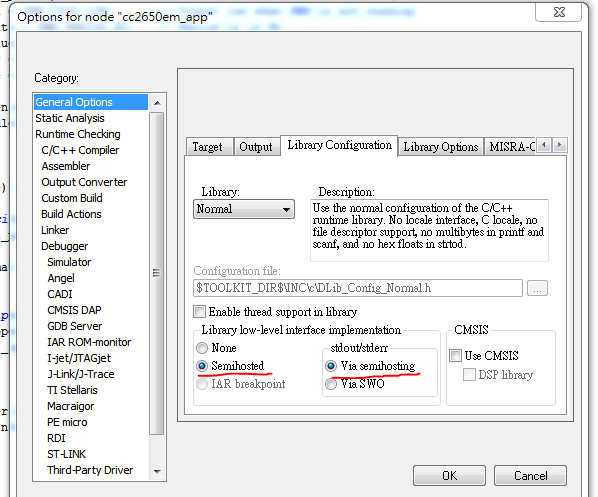
1.I use IAR as IDE to develop CC2640 BLE project and XDS100V3 as debugger.First make sure           enable the Semihosted and Via semihosting in General Options.
 
2.Add below code in app_ble.cfg file.
 

3.Add include header file and test.


4.In debug mode enable View->Terminal I/O and we can see the Hello World! in terminal.


Ref:
     1.System_printf and printf() on CC2650 sensorTag
     2.System_printf supported format specifications

2017年12月24日 星期日

CC2640: Add Watchdog driver to project.

1.Add ble_sdk_2_02_01_18\src\components\services\src\watchdog
   Watchdog.h, WatchdogCC26XX.c, WatchdogCC26XX.h to your project, and add
   $SRC_COMMON$/services/src/watchdog to your project include path.
2.In CC2650DK_5XD.h(Select what platform you use) add below code.

3.In CC2650DK_5XD.c(Select what platform you use) add below code.

4.Add below code to your application.


Ref:
      1.RTOS/CC2640: How to set CC2640 watchdog with TIRTOS 2.13
      2.WatchdogCC26XX.h File Reference
      3.CC2640 看门狗
      4.http://blog.csdn.net/zzfenglin/article/details/52253536

Linux driver: How to enable dynamic debug at booting time for built-in driver.

 Dynamic debug is useful for debug driver, and can be enable by: 1. Mount debug fs #>mount -t debugfs none /sys/kernel/debug 2. Enable dy...